

An assistant lands in an unfamiliar project and needs to choose where to look. Without a useful search term, the first step is the map.
The idea in one picture
Kimono RAG MCP 0.9.6 adds aikido_structure, a read-only tool that returns the file tree of your snapshot, under the same ignore rules as the rest of Kimono RAG MCP. Each file carries a type and an idx flag telling whether Kimono RAG MCP indexes it, so the assistant sees at once what a search can reach and what it cannot.
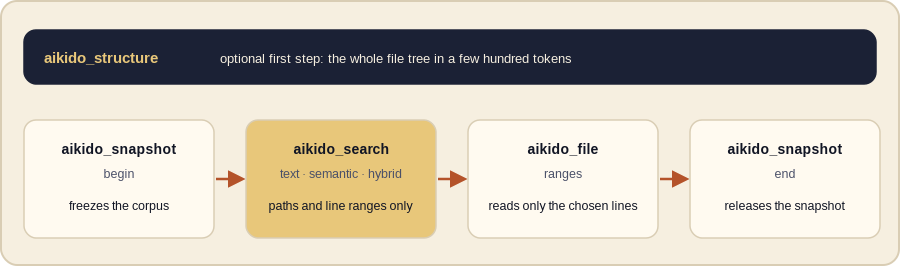
What you ask your assistant
In VS Code, you open your assistant’s chat with Kimono RAG MCP connected and write, as you would to a colleague:
Show me the shape of this project, limited to the src folder. Then tell me which files Kimono RAG MCP does not index.The assistant answers within seconds, without having opened a single file. It first shows src: an api/ folder and an index.ts file. It then points out that two files are out of reach of search: an exclusion file (.gitignore) and an image (logo.png). You already know what a search can find, and what it never will.
You follow up: “Give me the whole tree, in compact form”. This is what appears, twelve lines for the entire project:
.gitignore ignore 0 14
Dockerfile docker 1 13
README.md readme 1 32
assets/
 logo.png image 0 5
docs/
 architecture.md md 1 37
package.json manifest 1 16
src/
 api/
  ping.ts ts 1 34
index.ts ts 1 31Under the hood
Behind your question about unindexed files, the assistant called aikido_structure with idx: 0. This is the raw reply it received:
{"v":"a0de78c5…","n":2,"idx":0,
"data":{".gitignore":["ignore",0,14],"assets/":{"logo.png":["image",0,5]}}}- 8files in the example project
- 6of them indexed; 2 are not (an ignore file and an image)
- 12lines for the whole tree in text form
The answer also carries a version marker v. Pass it back as since and, if nothing changed, the tool replies {"unchanged":true} instead of resending the tree.