








A software engineer at a low desk in a sunlit dojo, one document glowing gold among many faint ones
Kimono RAG MCP · A tool for the AI-KIDO method

The right context.
Fewer tokens. More productive work.

Your assistant does not need to read everything. Kimono RAG MCP finds the useful passages in your code and documents: less noise, less waiting. Indexing runs on your machine: during that stage, nothing the server reads is sent to a remote LLM.

Available on the Visual Studio Marketplace · Local indexing, sized to your CPU/GPU · No corpus sent to a third party during indexing · RAG mode leaves your files unchanged

  • 174 code languages optimizedSyntax-aware chunking with Tree-sitter
  • 9 modelsEmbeddings for code, documents or both
  • Shared snapshotsOne view for delegated agents
  • Multi-repo searchRepositories counted together
  • Local indexingYour corpus is not sent to a remote LLM for indexing

Don't spend context on what your assistant doesn't need to read.

Before answering or planning a change, an assistant explores your project. Kimono RAG MCP targets this phase: locate the right sources, then read only what actually helps move the task forward.

Your time

Less searching, more progress

Find a business rule, configuration or feature implementation without manually opening a succession of files.

Your context budget

Send what's useful, not the whole project

Kimono RAG MCP points to relevant locations. Your assistant retrieves the passages it needs instead of accumulating entire files in the conversation.

Your team

Reuse what you already know

Make your code, documents and AI-KIDO knowledge easier to find. The method organizes the memory; Kimono RAG MCP helps your assistants use it.

Privacy · Data control · Zero Trust

Index your knowledge without sending it to a remote LLM

Extraction, chunking and embedding computation run on the Kimono RAG MCP host: your workstation or the server you choose. During indexing, no data seen by the server is sent to a remote LLM or embedding API. Its embedding models run locally; they are not remote generative assistants. The server audits the CPU and GPU usage available on the host and sizes itself to it, so MCP tools run at the best measured speed without changing where the data lives.

Kido seated at a low table inside a closed dojo room, studying a stack of glowing documents that stay in the room.Local processing

Keep control of your corpus

Code, documents and vector representations are processed on the server host. Initial model downloads are a separate operation requiring confirmation; they do not send the documents being indexed to the model provider.

Kido in a settled aikido stance, balancing two glowing orbs for CPU and GPU, sizing the effort to the machine.Resource budgets

Size indexing for the machine

The engine evaluates available CPU and memory resources to size its workers, threads and batches within configured budgets. For ONNX models, automatic selection compares available CPU and accelerated providers, including CUDA or Core ML depending on the host, and selects the measured fastest option. A GPU is not assumed to be faster.

Kido hands a single glowing passage through a slightly open door while the rest of the stack stays inside.Context consumption

Choose where your assistant runs too

Local indexing and the assistant’s response are separate stages. Passages read through MCP may be sent to that assistant’s model. If third-party disclosure is prohibited, use a local model or controlled private infrastructure too, with a client configured accordingly.

Useful context within an explicit trust boundary

This separation helps minimize exposed data: the corpus is indexed locally, then only requested passages are provided to the MCP client. It follows the market’s expected practices for Zero Trust and non-disclosure to third parties: data minimization, least privilege, no third-party flow during indexing. It does not by itself constitute Zero Trust certification. Authentication, authorization, isolation, file access and network egress controls still need to be established in your deployment.

For the consumption stage, one choice remains: the model that reads the retrieved passages. A Zero Data Retention (ZDR) LLM service, or another sovereign or private solution on the market, lets you meet the strictest expectations, depending on the features and terms actually covered. A ZDR service still receives the data sent to it: ZDR means neither no third-party transmission nor sovereignty. For a sovereign or private solution, also verify hosting, operators, jurisdiction, logs, backups and subprocessors, along with your organization’s applicable obligations.

Use cases where code must not be disclosed

The contexts in which clients most often require this guarantee:

  • R&D and intellectual property: proprietary code, algorithms, prototypes, pending patents and trade secrets.
  • Software vendors and embedded or industrial systems: product source code, firmware, protocols and differentiating know-how.
  • Service providers and multi-client teams: repositories under NDA, segregated case files and contractual confidentiality commitments.
  • Healthcare, finance and insurance: sensitive documents and data, subject to minimization, access controls and sector-specific requirements.
  • Legal, audit and strategic operations: contracts, confidential cases, internal analysis and mergers and acquisitions.
  • Security, compliance and pre-release code: unpublished fixes, vulnerability analysis, audit findings and secrets inventories.
  • Personal data and regulated data: code and documents that process customer, employee or user data under privacy law.
  • Public sector, defense and critical infrastructure: restricted-access environments, residency requirements or isolated networks after provisioning the required components.

References: NIST Zero Trust principles · example ZDR terms and scope. Choosing Kimono alone does not establish regulatory compliance or sector-specific accreditation.

Efficiency · Token FinOps · TCO

Measured gains in research and planning

Two tasks, the same corpus and the same model: standard Copilot search compared with Kimono RAG MCP. The gains shown are cumulative input context and elapsed time, not an estimated bill.

Standard Copilot search → Kimono RAG MCP · 25 October 2026 benchmark
Work phaseCumulative input tokensToken reductionElapsed timeTime reduction
Research indexing and ignore rules323,368 → 105,223−67.5%111.212 s → 79.077 s−28.9%
Prepare an implementation plan454,796 → 130,244−71.4%175.224 s → 84.034 s−52.0%

Gemini 3.8 Flash · Copilot CLI 1.0.103 · Local lexical RAG · 51 identical files · One run per method and task. Input tokens are cumulative across model requests, including cache-read tokens. Read the protocol and detailed results.

Token FinOps

Manage context consumption

Sending less irrelevant content to the model is a lever for managing consumption during exploration. Measure it on your own tasks and models.

Operational efficiency

Reduce back-and-forth

In these trials, tool calls fall from 22 to 8 for research and from 30 to 8 for planning. The assistant spends fewer exchanges gathering context.

Total cost of ownership

Connect AI usage with team time

TCO includes model consumption, working time, setup and operations. Kimono RAG MCP addresses context retrieval; the overall benefit needs evaluation in your environment.

Fewer tokens do not automatically mean a bill reduced by the same percentage. Cost depends on your provider, model, caching and subscription. Include local indexing time and resources in your assessment too. These two trials do not guarantee the same gains on every project and do not measure full TCO.

An ordinary project or an AI-KIDO Memory Bank

RAG mode works without reorganizing your project. AI-KIDO mode also exposes the personas, commands and workflows in your structured knowledge base: choose the mode and folder in the management panel.

Kimono RAG MCP 0.9.9

Better-structured context, shared and under your control

New in 0.9.9: syntax-aware code chunks, a model catalogue you can tune, and snapshots designed for each kind of task.

Kido crouches over a tray to assemble a branching structure representing code syntax.Code structure

Code split at syntax boundaries

Find your language and its extensions in the alphabetical catalogue below.

Explore the details
Kido sits cross-legged and sorts sources on a board to illustrate code and document embedding choices.Embedding catalogue

Nine models, chosen for the corpus

Match retrieval to your corpus: code and document profiles, languages and available resources.

Explore the details
Kido lunges to distribute three agent connections from one shared project snapshot.Prompt and swarm

One freeze, many agents, one end

Share context preparation instead of repeating it for every agent.

Explore the details
Kido balances on one foot while adjusting the time rings around a captured document.Choose the scope

Match snapshot lifetime to the work

Choose a capture lifetime for a task, a session or an explicit call.

Explore the details
Kido moves between repository baskets to sort glowing document tiles.Corpus accounting

See what each repository contributes

Identify each repository’s contribution, including files represented by metadata only.

Explore the details
Kido holds a low protective stance, shielding the existing index tree as document tiles circulate beside it.Reliable indexing

Change policy without losing the previous index

Evolve your configuration while keeping a usable index generation.

Explore the details

Explore all the release details below, also covered in the Kimono RAG MCP 0.9.9 release article.

All Tree-sitter languages and parsers

Version 0.9.9 upgrades Tree-sitter from 0.25.10 to 0.27.2. The registry contains 24 official grammars and 169 compatible third-party grammar crates, covering 174 additional languages. Four GPL/LGPL-licensed grammars are excluded from the MIT binary. The complete, versioned Tree-sitter registry tree-sitter-grammars.json lists every compatible crate.

Instead of splitting every source file at an arbitrary line count, Kimono RAG MCP can split many languages around syntax definitions. It also recognizes top-level JSON keys and JSDoc @typedef, @callback and @interface blocks. That gives search smaller code passages with their structure intact.

The 24 official grammars

  • Agda
  • Bash / Shell
  • C
  • C#
  • C++
  • CSS
  • ERB / EJS
  • Go
  • Haskell
  • HTML
  • Java
  • JavaScript / JSX
  • JSDoc
  • JSON / JSONC
  • Julia
  • OCaml
  • PHP
  • Python
  • Regex
  • Ruby
  • Rust
  • Scala
  • TypeScript / TSX
  • Verilog

A code parser is not required for indexing. Within the selected folders and configured extensions, readable text files remain indexed even without a syntax parser: they use standard text chunking instead of syntax-aware code chunking.

Files whose content cannot be indexed, including non-text files, remain represented by their metadata: name, path, extension, size and modification date. Their presence can therefore be found without indexing their binary content. Ignore rules and configured size limits still apply.

All file extensions covered by the official grammars
  • Agda — .agda
  • Bash / Shell — .sh, .bash, .zsh, .ksh
  • C — .c, .h
  • C# — .cs, .csx
  • C++ — .cc, .cpp, .cxx, .c++, .hpp, .hh, .hxx, .inl, .ipp
  • CSS — .css
  • ERB / EJS — .erb, .ejs
  • Go — .go
  • Haskell — .hs, .lhs
  • HTML — .html, .htm
  • Java — .java
  • JavaScript / JSX — .js, .jsx, .mjs, .cjs
  • JSON / JSONC — .json, .jsonc
  • Julia — .jl
  • OCaml — .ml, .mli
  • PHP — .php, .phtml
  • Python — .py, .pyi, .pyw
  • Ruby — .rb, .rake, .gemspec
  • Rust — .rs
  • Scala — .scala, .sc, .sbt
  • TypeScript / TSX — .ts, .mts, .cts, .tsx
  • Verilog / SystemVerilog — .v, .vh, .sv, .svh

The compatible catalogue, A to Z

The 169 compatible crates expose 174 parser entries, including variants. Expand an alphabetical range to see names and mapped extensions. This catalogue includes data formats, configurations, templates and specialized parsers, not only programming languages.

A–C · 29 parser entries

  • Actions †
  • Ada — .adb, .ads
  • ADL — .adl
  • Applesoft BASIC †
  • Arduino — .ino
  • ArkTS — .ets
  • Assembly — .asm, .s
  • Astro — .astro
  • Batch / CMD — .bat, .cmd
  • Bicep — .bicep
  • BLK — .blk
  • BPF C †
  • BSL / OneScript — .bsl, .os
  • C comments code split †
  • C preprocessor code split †
  • CFEngine — .cf
  • CFML — .cfm, .cfml
  • CFQuery †
  • CFScript — .cfc
  • Clingo — .lp
  • Clojure / ClojureScript / EDN — .clj, .cljs, .cljc, .edn
  • CMake — .cmake
  • CodeQL — .ql, .qll
  • CodeQL database schema — .dbscheme
  • Comments †
  • Common Lisp — .lisp, .cl
  • Crystal — .cr
  • CUDA — .cu, .cuh
  • Cypher — .cypher

D–G · 36 parser entries

  • D — .d
  • D2 — .d2
  • Dafny — .dfy
  • Dart — .dart
  • Dart (Orchard) †
  • daScript — .das
  • Device Tree — .dts, .dtsi
  • Diff / Patch — .diff, .patch
  • DM / BYOND — .dm, .dme
  • Dockerfile / Containerfile — .dockerfile, .containerfile
  • DSHL — .dshl
  • DTD — .dtd
  • Elixir — .ex, .exs
  • Elm — .elm
  • Emacs Lisp — .el
  • EPICS database †
  • Erlang — .erl, .hrl
  • F# — .fs, .fsx
  • F# signatures — .fsi
  • FlatBuffers — .fbs
  • Fluent Bit †
  • Fortran — .f, .f90, .f95, .f03, .f08, .for
  • GDScript — .gd
  • Git commit †
  • GitHub Actions expressions †
  • Gleam — .gleam
  • GLSL — .glsl, .vert, .frag
  • Go (alternative parser) †
  • Go modules — .mod
  • Go sums — .sum
  • Godot resources — .tscn, .tres
  • Godot shaders — .gdshader
  • GraphQL — .graphql, .gql
  • Groovy / Gradle — .groovy, .gvy, .gradle
  • Grug — .grug
  • GW-BASIC — .bas

H–L · 24 parser entries

  • Harn — .harn
  • HCL / Terraform / Nomad — .hcl, .tf, .tfvars, .nomad
  • HEEx — .heex
  • HLSL — .hlsl
  • Hygen templates †
  • IEC Structured Text — .st
  • INI — .ini, .cfg
  • Ink — .ink
  • Integer BASIC †
  • iRules — .irul
  • Java (Orchard) †
  • Javadoc †
  • Jinja dialects †
  • Jinja2 — .jinja, .jinja2, .j2
  • JSON5 — .json5
  • Jsonnet — .jsonnet, .libsonnet
  • Kconfig †
  • KDL — .kdl
  • Kotlin — .kt, .kts
  • LAMMPS †
  • LLVM IR — .ll
  • LOLCODE — .lol
  • Lua — .lua
  • Luau — .luau

M–O · 24 parser entries

  • Mage †
  • Make — .mk, .make
  • Markdown — .md, .markdown
  • MATLAB †
  • MDN †
  • Merlin 6502 †
  • Mermaid — .mmd, .mermaid
  • Microsoft BASIC 2 †
  • MLIR — .mlir
  • Mozilla C++ code split †
  • Mozilla JavaScript code split †
  • Mutt configuration †
  • NetLinx — .axs, .axi
  • Newick — .nwk, .newick
  • Nginx †
  • Nickel — .ncl
  • Nim — .nim, .nims
  • Nix — .nix
  • Objective-C / Objective-C++ — .m, .mm
  • ObjectScript UDL — .cls
  • OCamllex — .mll
  • Odin — .odin
  • OpenSCAD — .scad
  • OWL Manchester syntax — .omn

P–R · 29 parser entries

  • Pact — .pact
  • Pascal — .pas, .dpr, .lpr
  • PL/pgSQL †
  • PostgreSQL — .pgsql
  • PowerShell — .ps1, .psm1, .psd1
  • Printf formats †
  • Prisma — .prisma
  • Prolog — .pro, .prolog
  • Properties — .properties
  • Protocol Buffers — .proto
  • Puppet — .pp
  • Python (Orchard) †
  • QBasic †
  • QML — .qml
  • Quirrel — .nut
  • R — .r
  • Racket — .rkt
  • Razor — .cshtml, .razor
  • Reinhardt form †
  • Reinhardt head †
  • Reinhardt page †
  • Requirements †
  • reStructuredText — .rst
  • Rigz — .rigz
  • RISC-V †
  • RSML — .rsml
  • Rules †
  • Rush †
  • Rust (Orchard) †

S–T · 19 parser entries

  • Scheme — .scm, .ss
  • SDML — .sdml
  • Slang — .slang
  • Slint — .slint
  • Solidity — .sol
  • Soufflé — .dl
  • SPARQL — .sparql, .rq
  • SQL — .sql
  • Starlark / Bazel — .bzl, .star, .bazel
  • Svelte — .svelte
  • Swift — .swift
  • SysML — .sysml
  • SystemVerilog †
  • Templ — .templ
  • TLA+ — .tla
  • Tmux †
  • TOML — .toml
  • TRACE32 — .cmm
  • Tree-sitter queries †

U–Z · 13 parser entries

  • V †
  • Varlink — .varlink
  • VHDL — .vhd, .vhdl
  • Visual Basic .NET — .vb
  • Vue — .vue
  • WGSL — .wgsl
  • XCompose †
  • XML — .xml, .xsd, .xsl, .xslt, .wsdl, .plist, .csproj, .fsproj, .vbproj, .props, .targets, .nuspec, .xaml, .axaml, .resx, .storyboard
  • YAML — .yml, .yaml
  • Yarn lock †
  • Zathura configuration †
  • Zig — .zig
  • Zsh †

† Parser catalogued without its own extension mapping in this registry. Official grammars take precedence; a compatible entry does not mean it is automatically selected for every file in that language. The versioned registry tree-sitter-grammars.json preserves the technical IDs and exact mappings.


The nine embeddings and custom mode

The nine embedding models

These are the nine catalogue choices. Each card shows the selectable ID, local engine and vector dimension. Language profiles describe embeddings, not the Tree-sitter grammars above. Profiles come from the versioned catalogue embedding-models.ts.

  • Potion Code 16M v2code · Model2Vec · 256 dimensions. Code; English; static embeddings for fast local indexing.
  • Potion Multilingual 128Mmultilingual-fast · Model2Vec · 256 dimensions. Multilingual documents; static embeddings.
  • Multilingual E5 smalle5 · ONNX · 384 dimensions. Multilingual documents; contextual model supplied in the host bundle.
  • Jina v2 base codejina-code · ONNX · 768 dimensions. Code; catalogue describes 30 programming languages and English text.
  • BGE-M3bge-m3 · ONNX · 1 024 dimensions. Code and documents; multilingual.
  • Nomic Embed Text v1.5nomic-v1.5 · ONNX · 768 dimensions. English documents.
  • mxbai-embed-large v1mxbai-large · ONNX · 1 024 dimensions. English documents.
  • Multilingual E5 largee5-large · ONNX · 1 024 dimensions. Multilingual documents; larger contextual model.
  • all-MiniLM-L6-v2minilm · ONNX · 384 dimensions. English documents; compact contextual model.

What custom mode lets you do

In the model-management panel, choose custom instead of an automatic policy. Two independent pickers let you select one catalogue model for code and another for documents. For example: Jina v2 base code for source files and Multilingual E5 large for documentation. This is a configuration choice, not a measured performance claim.

  1. Compare profiles: code or document use, language, download size, license and estimated memory. Inspecting status never triggers a download.
  2. Select the code and document models independently from the nine pinned catalogue entries. Custom mode does not load an arbitrary model or URL.
  3. Explicitly approve any required downloads. Revisions, sizes and SHA-256 checksums are verified; the corpus is not sent to an external embedding API.
  4. Confirm the configuration. Kimono RAG MCP partitions files by content type, rebuilds the index in the background and activates the new generation only after success. Missing models are reported, not silently substituted.
  5. Track requested and active policies. If rebuilding fails, the previous index stays available; existing snapshots retain their selection. Vectors from different models stay separate and search results are fused by rank.

auto-speed remains the default policy in 0.9.9; custom gives you control over that model pair. If the corpus contains only code or only documents, only the matching profile is used. Embeddings are computed locally; passages returned to chat may subsequently be sent to your assistant’s model provider.

Downloaded ONNX models now receive only the inputs their model graph declares. That avoids sending unsupported inputs to XLM-R models, while the bundled E5 model keeps its existing path.

Snapshots, multiple searches and delegated agents

A project question can cross source code, documentation and nested repositories. When an assistant delegates those checks, each agent needs to search the same project state. Kimono RAG MCP server 0.9.9 improves that retrieval layer: it helps an orchestrator share one snapshot, but it does not create or coordinate agents.

Ask once, then let the task fan out

In an MCP-capable chat, ask for a concrete investigation. If the assistant supports delegated work, tell it to keep those searches on the same Kimono RAG MCP snapshot:

text
Find where requests are parsed across this project and its Git repositories. Compare the implementation with the documentation. Freeze one Kimono RAG MCP snapshot for the task and share its snapshotId with the code and documentation agents. Reuse it for all searches and reads, without a new freeze for each agent or search. Return relevant paths first, then read only the passages needed. End the shared snapshot once, after all agents have finished.
A prompt to type in your assistant; delegation and snapshot sharing depend on the orchestrator.

The orchestrator calls begin once to freeze the relevant corpus, then passes the returned snapshotId to its delegated agents. The code agent can run several searches and read selected functions while the documentation agent checks the written rules against that same snapshot. Every aikido_search and aikido_file request reuses the shared ID: neither a new question nor a new agent requires its own freeze.

The optimization is shared preparation: one captured corpus instead of separate captures for every search or agent, fewer lifecycle calls, and one consistent project state for comparing their findings. Agents retrieve only their own relevant passages; sharing a snapshot does not mean sending the whole corpus to each model. Independent queries can also be grouped in one search request, and selected file ranges in one read request. The Kimono RAG MCP retrieval guide MCP retrieval reference documents these operations.

Once all delegated searches and reads have finished, the orchestrator calls end once for the shared snapshot. Agents do not each release it after their own search. The task therefore follows one freeze → several agents, searches and reads → one end, not a complete freeze/search/read/end cycle repeated for every search.

In 0.9.9, the default prompt scope can also reuse a live snapshot on a subsequent begin for the same user, owner and paths while the corpus is unchanged. Explicitly passing the existing ID keeps delegated work on the captured state even if source files change meanwhile. session keeps a view for the server session; call closes it immediately on end. To inspect edits, start a new capture; fresh: true forces one.

Calling end releases a snapshot; released ones close after 120 seconds idle. A snapshot's sliding lifetime tops out at one hour. At the default limit of eight active snapshots or the byte budget, Kimono RAG MCP evicts released snapshots first.

One snapshot shared by several agentsOrchestrator: one freeze · beginOne snapshotId shared by every agentCode agentSearch × N ·Read × NDocs agentSearch × N ·Read × NConfigagentSearch × N ·Read × NOrchestrator: one endAfter every agent has finished
One freeze and one final end surround all agents' searches and reads on the same snapshot.
Multi-repository accounting and reliable indexing

Corpus status now accounts for Git-kept files in each repository. Excluded directories, temporary files and environment templates can be counted as metadata only; Git-tracked files remain indexed even when a .gitignore rule matches, and .git/info/exclude is honored. The report explains metadata-only files. On modified trees, Kimono RAG MCP can reuse vectors for unchanged documents. When you change the embedding policy during an indexing run, Kimono RAG MCP stops that run instead of refusing the change. Server shutdown cancels indexing cleanly, releases its locks and keeps the previous generation unless the new one completed successfully.

Release sources
  1. Kimono RAG MCP Changelog — version 0.9.9
  2. Kimono RAG MCP MCP retrieval reference
  3. Kimono RAG MCP tree-sitter-grammars.json — v0.9.9
  4. Kimono RAG MCP embedding-models.ts — v0.9.9

Your answers aren't always in the code.

At the heart of Kimono RAG MCP: indexing your knowledge and data into a common knowledge base that several people and agents can query. Meeting notes, specifications, spreadsheets and presentations become shared sources, not attachments to resend in every conversation.

Chibi Kido kneels to retrieve a glowing document from a knowledge library.Find an answer

Search your working documents

Search text in supported Word documents, Excel sheets, PowerPoint presentations and PDFs without manually converting them for your assistant.

Kido carries a small glowing excerpt in a bounding step, leaving the large document behind.Return to the source

Read the passage, not the whole folder

Kimono RAG MCP locates useful information and lets the assistant read its text representation. You keep your originals unchanged.

Kido lies on the tatami to inspect the glowing metadata tag of a closed document.Keep a lead

Find files even when content isn't readable

When text cannot be extracted, the filename, location and available file information can help you find it. Kimono RAG MCP reports the limit rather than inventing content.

Indexable documents and data

Text files are read directly; they do not need an office document extractor. The default RAG corpus includes:

  • Notes and documentation: .md, .mdx, .mdc, .txt, .rst, .adoc, .tex, .bib, .rmd, plus extensionless README, LICENSE, NOTICE and CHANGELOG files.
  • Data and interchange: .csv, .tsv, .json, .jsonc, .json5, .xml, .yaml, .yml, .toml.
  • Configuration and schemas: .ini, .cfg, .conf, .properties, .config, .plist, .xsd, .wsdl, .avsc, .prisma, plus project and configuration files recognized by name.

Other text sources in the corpus, including the languages and extensions listed above, are searchable too. The syntax parser catalogue alone does not determine which files can be indexed: the RAG corpus has its own customizable selection of extensions and filenames.

Extractors for office documents and PDF

  • Word — .docx: text from the main document’s paragraphs, for finding written decisions and requirements.
  • Excel — .xlsx: cell values with worksheet names and cell addresses. Stored values are used, or formula text when no value is available; the workbook is not recalculated.
  • PowerPoint — .pptx: slide text in presentation order, with slide numbers.
  • PDF — .pdf: existing text extracted through Poppler’s pdftotext. Image-only scans need OCR beforehand; this extractor does not perform OCR.

Document indexing is the foundation of the knowledge base: it covers the knowledge and data in the configured corpus, not just code documentation. Text, Markdown, office documents and structured data form one searchable collection of sources. Several people and agents can query the same instance and retrieve the same references without copying the knowledge base into every conversation.

Specialized parsers enrich that foundation: JSON and JSONC can be split around top-level keys, while compatible parsers cover formats such as YAML and TOML. Without a syntax parser, readable text uses standard text chunking. Code parsing is an additional capability of this document knowledge base, not a requirement for adding knowledge to it.

Extracted text participates in literal and semantic retrieval alongside the other project sources. Document embeddings are selected separately from code embeddings, so reports and specifications can use a profile suited to their language. When extraction is unavailable or fails, the file remains represented by metadata.

Document extraction has been available since 0.6.6 and is included in 0.9.9. PDF extraction requires Poppler on the server host. Configured extensions, corpus exclusions and size limits apply. Supported formats and usage guide.

See what Kimono RAG MCP is doing, without leaving your workflow.

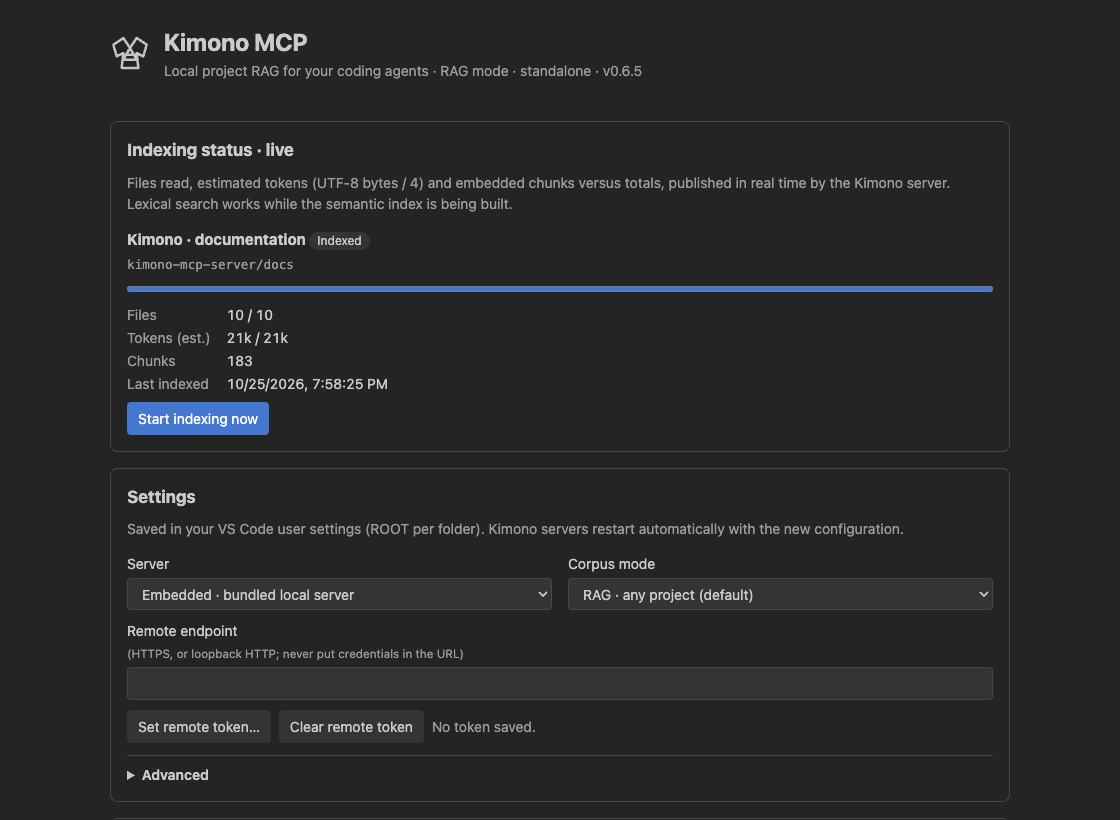
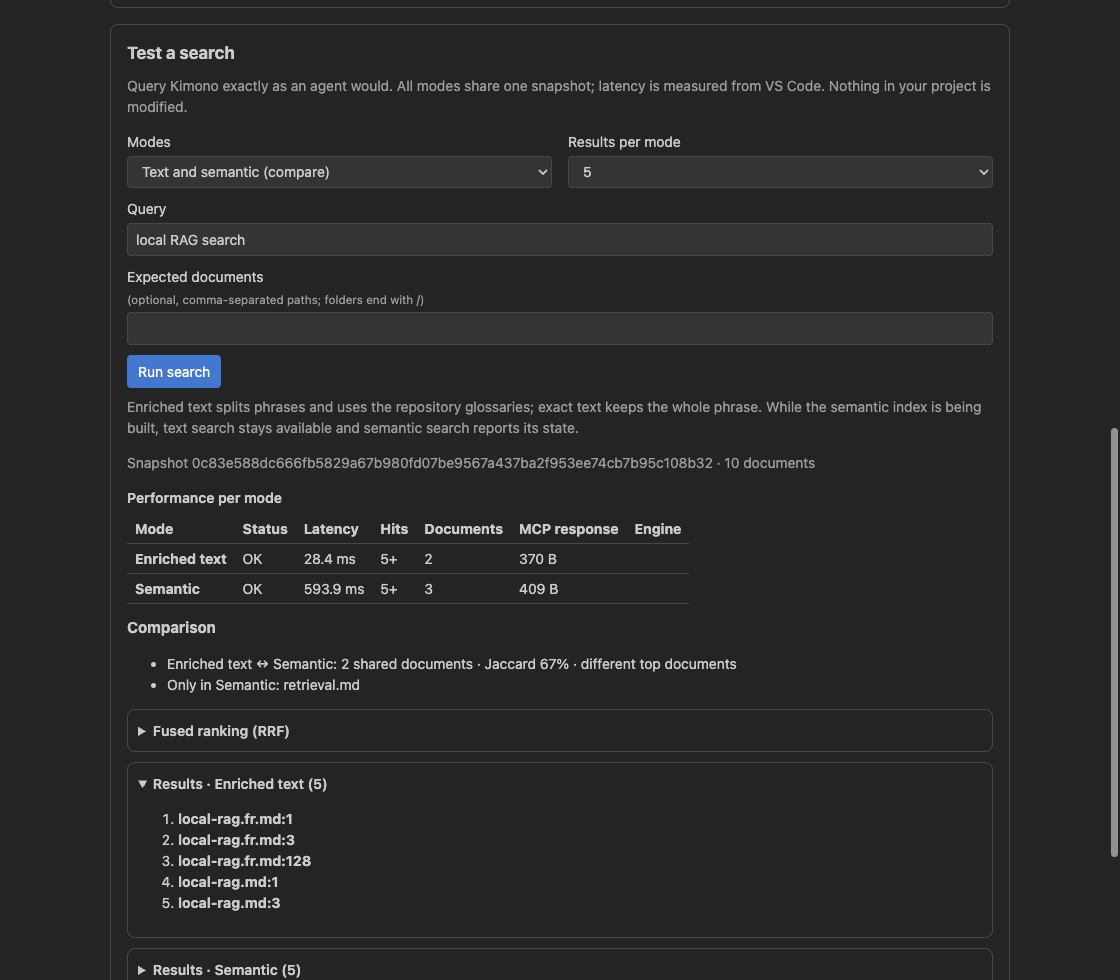
The management panel lets you check that your project is ready, choose your corpus and test a search before giving your assistant a task.

English Kimono RAG MCP management panel showing real indexing status for the public Kimono RAG MCP documentation and corpus settings.
Monitor indexing and choose the project your assistant can access. Click to enlarge.
A real Kimono RAG MCP search test against its public documentation, comparing text and semantic search and showing result locations.
Test a question and check the sources found. Panel from the locally installed 0.6.5 extension, rendered for this demonstration on public Kimono RAG MCP documentation; real search results, no private data.

From installation to your first question

Start with a project you know. Compare the sources found and decide where Kimono RAG MCP saves you time.

  1. Install Kimono RAG MCP

    Add Kimono RAG MCP by AI-KIDO from the Marketplace. Components needed for project search are included.

  2. Open your project

    Trust the folder in VS Code, then run MCP: List Servers, start Kimono and enable its tools in your assistant.

  3. Ask a real question

    Ask where a feature lives or how a rule works. Open Kimono: Open Management Panel to monitor indexing and test search.

0.9.9 is the server version; the VS Code extension follows its own release cycle. Server release notes.

VS Code 1.106 or later and an MCP-capable assistant. Available hosts: macOS Apple Silicon, Linux ARM64/x64 and Windows x64. For remote environments, install the extension on the project host. Detailed installation guide.

Three questions for your first trial

Understand

“Use Kimono RAG MCP to find where this project's configuration rules are defined and explain the relevant passages.”

Prepare

“Use Kimono RAG MCP to identify files affected by this change and propose a plan based on the sources you find.”

Reuse

“In our AI-KIDO base, find the practice or workflow that fits this task.”

Your assistant must have Kimono RAG MCP tools enabled. It remains responsible for answers and execution; check its sources and approve actions as usual.

Local today, shared with the team tomorrow

Use Kimono RAG MCP locally or connect several assistants to a shared corpus. Everyone finds the same references without circulating more copies of your documents.

Separate workspaces each have their own Kimono RAG MCP instance and knowledge. Today

On your own

Kimono RAG MCP runs in your editor and searches the project you opened. Each workspace keeps its own instance and its own knowledge.

Four colleagues work on laptops connected to one shared holographic knowledge tree. Tomorrow

Shared with the team

A Docker server shares one corpus and its search between several assistants. Your team chooses hosting and access.

Choose the way you want to work

The VS Code extension is the simplest starting point. Other installations let you share a server or use another MCP-compatible assistant.

In your IDE

Install the extension and work on the open project, without deploying a separate server.

Start in VS Code →

For several assistants

Follow the Docker guide to configure the server, its corpus and your assistants’ connections.

Shared server guide →

With another MCP client

A native installation connects a compatible assistant locally. Dedicated direct LLM CLI integrations are planned, not yet shipped.

Other ways to use Kimono RAG MCP →

Simple adoption, clear boundaries

Your files stay yours

RAG mode searches and reads without modifying your project. Your assistant retains its usual permissions; Kimono RAG MCP does not choose actions for you.

You choose the scope

Choose which folders to index and review exclusions. Indexing is local, but the assistant may send retrieved passages to its model provider.

You measure your benefit

Start with a recurring task. Compare time, context consumption and source relevance before rolling it out to the team.

Kimono RAG MCP does not scan contents for secrets. For a shared server, have hosting and access reviewed. Read limits and recommendations.

Your next improvement starts with a real question.

Install Kimono RAG MCP, open your project and ask your assistant to find what it needs. Observe the sources, context consumption and time saved.